
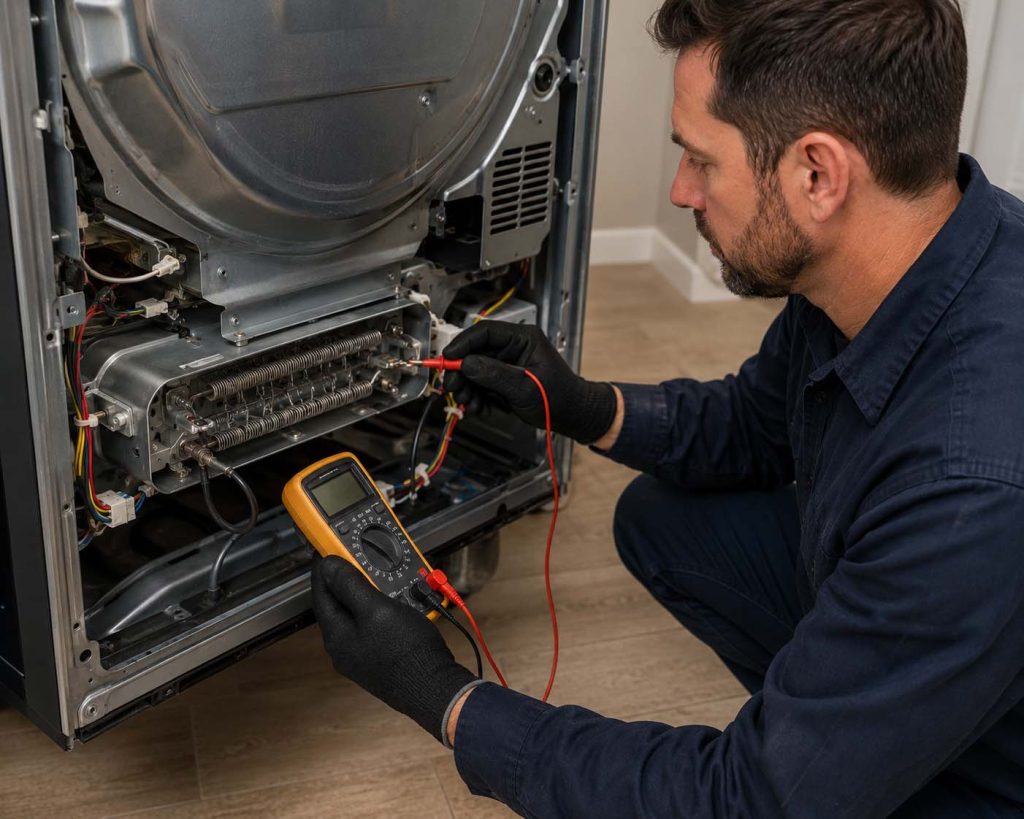
A Samsung dryer that runs but never heats most often has a tripped 240-volt breaker leg, a blown thermal cut-off fuse, or a failed heating element. Clogged vents cause most fuse failures. Check the breaker and lint screen first; if the drum stays cold after a reset, the element or fuse needs testing.
This guide walks you through all 7 causes of a Samsung dryer not heating, from a 2-minute breaker check to component testing. 5 Star Appliance Repair is a family-owned company that has serviced dryers and other major appliances for more than 20 years, across every Samsung model line. Work through the quick checks below, and if the drum is still cold at the end, our dryer repair service can usually finish the job in one visit.
Safety first: two rules before you touch anything
Unplug the dryer before removing any panel. An electric dryer runs on a 240-volt circuit, which can deliver a dangerous shock even when the drum is not turning.
If you have a gas dryer and smell gas, stop. Do not test parts or relight anything — leave the house and call your gas company first. A repair technician takes over only after the line is confirmed safe.
Lint is the fuel in nearly every dryer fire, so never bypass a blown thermal fuse to “test” the dryer. That fuse is the safety device that shuts heat off when the machine overheats.
Why is your Samsung dryer running but not heating?
The motor and the heating system run on separate circuits, so the drum can spin normally while the heat source is dead. That split is the clue: the fault sits in the heating circuit, and the 7 causes below cover it from most to least likely.
1. A half-tripped 240-volt breaker (electric models)
A Samsung electric dryer needs both legs of a double 30-amp breaker; if one leg trips, the motor still runs on 120 volts but the element gets no power. This is the classic “runs but no heat” cause, and it costs nothing to fix.
Flip the dryer’s breaker fully OFF, then fully ON. A breaker that keeps tripping means a wiring or element fault — stop there and book a technician.
2. A blown thermal cut-off fuse
The thermal cut-off is a one-time fuse that kills the heating circuit when the dryer overheats. Once it blows, the dryer runs cold until the fuse is replaced.
Here is the part most people miss: the fuse blew for a reason, almost always a clogged vent. Replace the fuse without clearing the airflow problem and the new one blows within weeks.
3. A burned-out heating element
The element is a coiled wire inside a metal housing that glows red-hot to heat the air. Coils sag and snap with age, especially past year 5. On many Samsung DV-series electric models the element assembly is part DC47-00019A, one of the most-replaced Samsung dryer parts in the country.
4. A failed thermistor or cycling thermostat
These sensors read air temperature and tell the control board when to power the element. A failed sensor can report “hot” while the drum is ice cold, so the board never calls for heat. Sensor faults often show up alongside blinking display lights or a stored error code.
5. A clogged exhaust vent
A blocked vent traps heat until the high-limit thermostat or thermal cut-off shuts the element down. Early symptoms: clothes take 2 cycles, the top of the dryer feels hot, and the outside flap barely puffs air.
Pull the dryer out, detach the duct, and clear lint from the duct run and the outside hood. A full vent cleaning takes about 30 minutes and prevents the repeat fuse failures technicians see most often.
6. Gas models: igniter or gas valve coils
On a Samsung gas dryer, a glowing igniter opens the gas valve coils to light the burner. A weak igniter or worn coils produce the same symptom: the drum turns, the burner never lights. You can sometimes hear repeated clicking as the igniter tries and fails.
7. A control board fault
The board is the least likely culprit, which is why technicians test it last. Rule out the breaker, fuse, element, sensors, and airflow before spending money here. Board-level misdiagnosis is the most expensive mistake a DIY repair can make.
How to tell if a Samsung dryer heating element is bad
Unplug the dryer, remove the rear or lower panel, and disconnect the two wires on the element housing. Set a multimeter to ohms and touch the element terminals.
A healthy Samsung element typically reads roughly 8–12 ohms; an open reading (OL or infinity) means the coil has snapped and the element needs replacement. While the panel is off, test the thermal cut-off and thermostats the same way — a good fuse reads near 0 ohms.
No multimeter, or no appetite for panel removal? That is the point where a diagnostic visit earns its fee.
Fixes you can do yourself today
- Reset the breaker — fully OFF, then ON. Fixes the half-tripped leg in minutes.
- Soft-reset the dryer — unplug it for 1 to 5 minutes to clear the control board, then retest on a Time Dry cycle. Samsung documents this reset in its official dryer troubleshooting guide.
- Check the cycle settings — Air Fluff and Eco settings dry with little or no heat by design. Run Time Dry on high to test honestly.
- Clean the lint screen and vent — lint screen every load, full duct run at least yearly. This is the highest-value 30 minutes you can spend on a dryer.
- Replace the thermal fuse or element — reasonable for confident DIYers with the exact part for your model number, after the vent is cleared.
If the drum is still cold after the resets and a clear vent, the fault is a failed component. That moves you from cleaning to parts testing — the job a technician does fastest.
What a professional repair costs
Dryer no-heat repairs sit at the affordable end of appliance work because the parts are cheap. According to Angi’s dryer repair cost data, a thermal fuse runs $5–$18 and a thermostat $15–$60 in parts, with technician labor at $50–$100 per hour plus a $50–$80 service visit.
Heating elements cost more in parts but still land well below replacement territory for most households. Your exact quote depends on the failed part and your model, which is why 5 Star Appliance Repair gives an upfront price after diagnosis — and waives the service call fee when you proceed with the repair.
Timeframe matters too: a heating element, fuse, or thermostat swap is usually a one-visit fix, because vans stock common Samsung parts.
When to call a pro — and when to replace the dryer instead
Call a technician when the breaker and vent checks fail, when a gas line is involved, when the breaker keeps tripping, or when you would rather not open a 240-volt appliance. Booking our Samsung appliance repair team gets a factory-trained technician who diagnoses the heating circuit end to end, the same way we handle a Samsung dishwasher that won’t drain.
A dryer is a standard-tier appliance, so honest math applies: when a repair quote passes 50% of the price of a comparable new dryer, replacement usually wins. Age tips the scale too — our guide on whether to fix your old dryer or buy a new one walks through the full decision, so this post won’t repeat it.
For a no-heat fault specifically, the numbers usually favor repair: fuses, thermostats, and elements are among the cheapest major parts a dryer has.
Frequently asked questions
Why is my Samsung dryer running but not heating?
A Samsung dryer runs without heating because the motor and the heating system use separate circuits. The usual faults are one tripped leg of the 240-volt breaker, a blown thermal cut-off fuse, or a burned-out heating element. On gas models, a weak igniter or failed valve coils cause the same symptom. Check the breaker and vent before testing parts.
How do I reset a Samsung dryer?
Reset a Samsung dryer by unplugging it (or switching off its breaker) for 1 to 5 minutes, then restoring power. This clears the control board’s memory and any minor glitch codes. There is no dedicated reset button on most models. If the dryer still runs cold on a Time Dry cycle after the reset, a component has failed and needs testing.
How much does it cost to fix a dryer that won’t heat?
Fixing a dryer that won’t heat typically involves parts priced from $5–$18 for a thermal fuse to $15–$60 for a thermostat, plus $50–$100 per hour in labor and a $50–$80 service visit, per Angi’s cost data. Heating elements cost more but remain a mid-range repair. 5 Star Appliance Repair waives its service call fee when you approve the repair.
How long does a Samsung dryer heating repair take?
A Samsung dryer heating repair usually takes a single visit of about 1 hour once the fault is diagnosed, because fuses, thermostats, and elements are stocked, quick-swap parts. A clogged vent adds roughly 30 minutes of cleaning time. Rare control board replacements can require a second visit if the board must be ordered for your model.
Is it worth repairing a Samsung dryer that won’t heat?
Repairing a Samsung dryer that won’t heat is usually worth it, because the common failed parts are inexpensive relative to a new machine. Apply the 50% rule: repair when the quote is under half the cost of a comparable new dryer, and consider replacement past that line — especially if the dryer is over 10 years old with prior repairs.
Get your Samsung dryer heating again
Start with the free fixes: reset the breaker, clear the vent, and rerun a Time Dry cycle. If the drum stays cold, the fault is a testable component — and a one-visit repair in most cases. Book a diagnosis with our dryer repair team or reach us through the contact page, and a background-checked technician can have heat back before the next laundry day. The service call fee is waived when you approve the repair.